
Frame Translator
Figma plugin for automated app store screenshot localization, Co-founder
Context
Co-founder at 14x, an app studio shipping multiple consumer apps. I built Frame Translator in a single day, from idea to polished internal tool, using heavy AI-assisted development (Claude Code) as a speed and quality amplifier that compressed what would have been weeks of work into hours.
The problem
At 14x, every app we ship gets localized into 40+ languages across both Google Play and the App Store. That means creating translated screenshots for each store, for each language, and each store has its own set of supported locales with different codes and naming conventions.
Before this tool, the process was: manually translate each text string, duplicate the Figma frame, paste in the translation, check that text still fits the layout, repeat. For a single app with 8-10 frames across 2 stores, that's ~480 frames to produce manually. It was taking hours per app. Work that was repetitive, error-prone, and didn't scale.
The solution
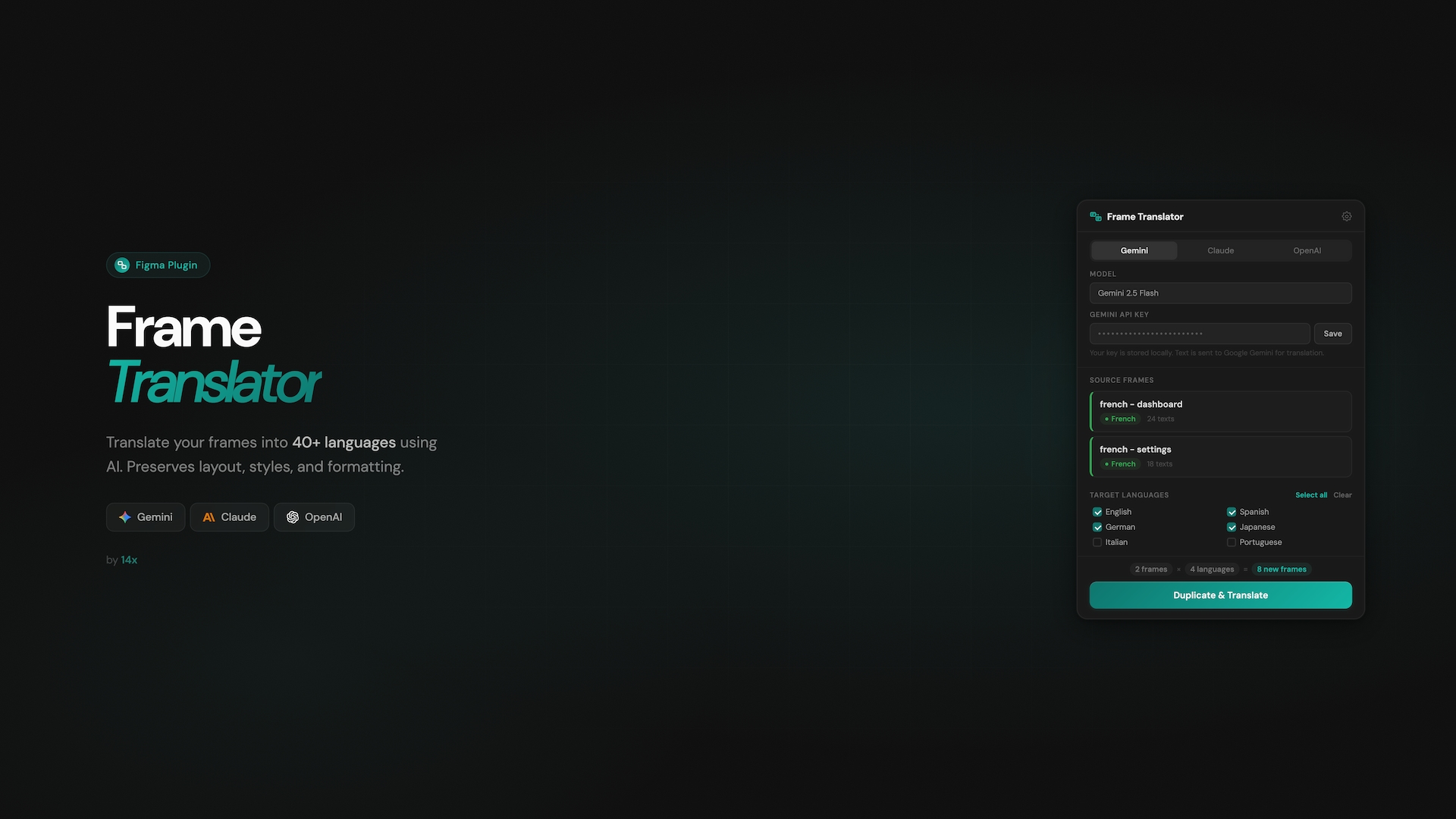
A Figma plugin that automates the entire localization workflow for app store screenshots. Select frames, the plugin detects the source language automatically from the frame name. Choose target languages filtered by store (Google Play vs. App Store vs. all). One click: AI translates all text, duplicates frames with correct locale-specific naming, and auto-fits text to maintain the original layout.
Font-size fitting algorithm. A binary search that finds the largest font size where translated text still fits within the original bounding box. Works with mixed-size text (preserves proportional relationships), handles all of Figma's auto-resize modes, and measures directly on the node in its real layout context. This is what makes Japanese, Ukrainian, and German all render correctly without breaking the design.
Smart language detection. A 3-pass matching engine (full names, locale codes via regex, bare ISO codes) with boundary checking, so "french - dashboard - 01" and "de-DE/screenshots/hero" both resolve correctly.
Store-aware locale system. Google Play and Apple App Store have different supported locale sets with different code formats (zh-CN vs zh-Hans, iw-IL vs he). The plugin maps between them and generates frame names using the exact code each store expects, matching the casing and separator conventions from the source frame.
Graceful font handling. Detects missing fonts before translation starts, offers a replacement picker or skip option. No silent failures.
Outcomes
4-8 hours saved per app launch on screenshot localization. Enabled 40+ language localization that we simply wouldn't have attempted manually. Internal tool that directly unblocks the studio's multi-market launch strategy. Polished enough to publish publicly (Figma Community plugin ID assigned).
Retrospective
The AI-assisted development workflow was the standout. Claude Code let me iterate rapidly on the hard algorithmic parts (font fitting edge cases, locale code parsing) while maintaining high quality. The "Design Engineer + AI" combination compressed weeks of work into days.
Investing in smart defaults (auto-detection, store filtering) rather than exposing complexity paid off immediately. The plugin feels simple to use despite handling dozens of edge cases underneath.
What I'd add next: live preview of translated text before committing the duplication, and batch export to render translated frames directly as images ready for store upload, closing the loop entirely.
Learnings
Build tools for your own workflow first. The best internal tools come from feeling the pain acutely. I knew every edge case because I'd hit them all manually.
Text layout is deceptively hard. Languages expand and contract unpredictably. German is verbose, Japanese is compact but needs different line-breaking. The binary-search fitting approach was the breakthrough that made all 40+ languages work without manual adjustment.
Figma's plugin sandbox forces clean architecture. The split between UI iframe (network access, no Figma API) and plugin code (Figma API, no network) seems limiting but actually produces well-separated concerns. The constraint was a feature.
AI as a craft amplifier, not a replacement. The design decisions (what to auto-detect, when to show a manual override, how to name frames) are the product work. AI handled the implementation volume so I could focus there.